RAG · Updated from retriever-updated.pdf · Class 41 · 08 Aug 2026
Retriever Guide
The retriever finds evidence for the LLM — it does not write the answer.
Covers transforms (HyDE, multi-query), retrieval patterns, fusion, MMR, reranking, and contextual compression.
Query→Transform→Retrieve→Fuse→Rerank→Compress→LLM
01 · Definition
RAG pipeline & what a retriever is
In a RAG system the retriever sits after the vector store and before the LLM. It finds evidence; it does not write the final answer.
1
Documents → Parsing / Loading → Chunking
Raw knowledge becomes searchable pieces with metadata.
2
Embeddings → Vector store
Chunks become vectors; the store holds vectors + metadata for fast lookup.
3
Retriever
Takes the user query, searches the knowledge source, returns the most relevant documents/chunks.
4
LLM → Final answer
The model reads the retrieved context and generates the response.
“A retriever takes a user query and returns the most relevant documents or chunks from a knowledge source. It normally does not generate the final answer itself.”
— Retriever Guide PDF
Simple example
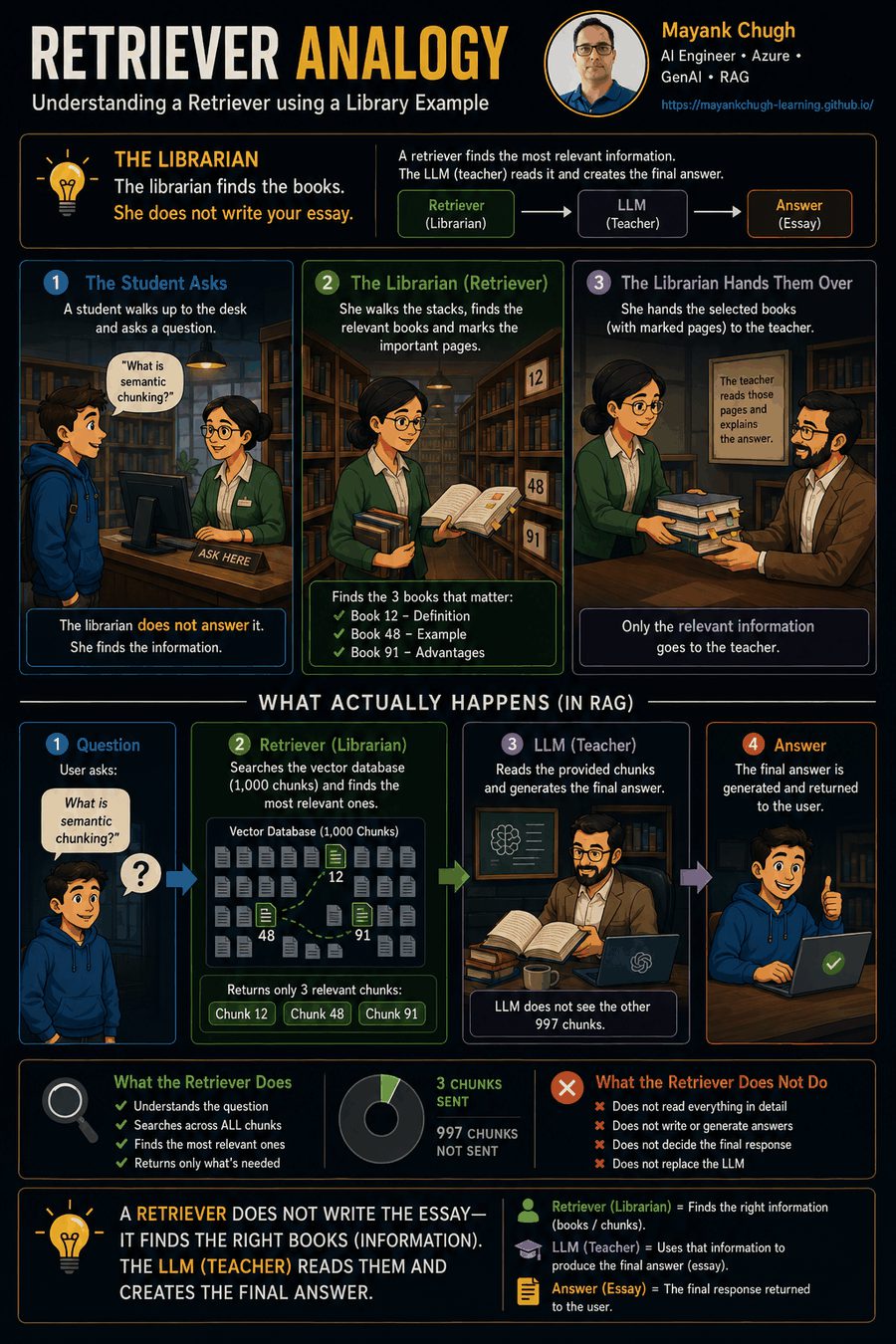
Database has 1,000 chunks. User asks: What is semantic chunking? The retriever does not send all 1,000 chunks. It returns only relevant ones (definition, example, advantages) for the LLM.
Analogies
Library
Librarian + teacher
User = student · Documents = books · Retriever = librarian · LLM = teacher. The librarian finds pages; the teacher explains.
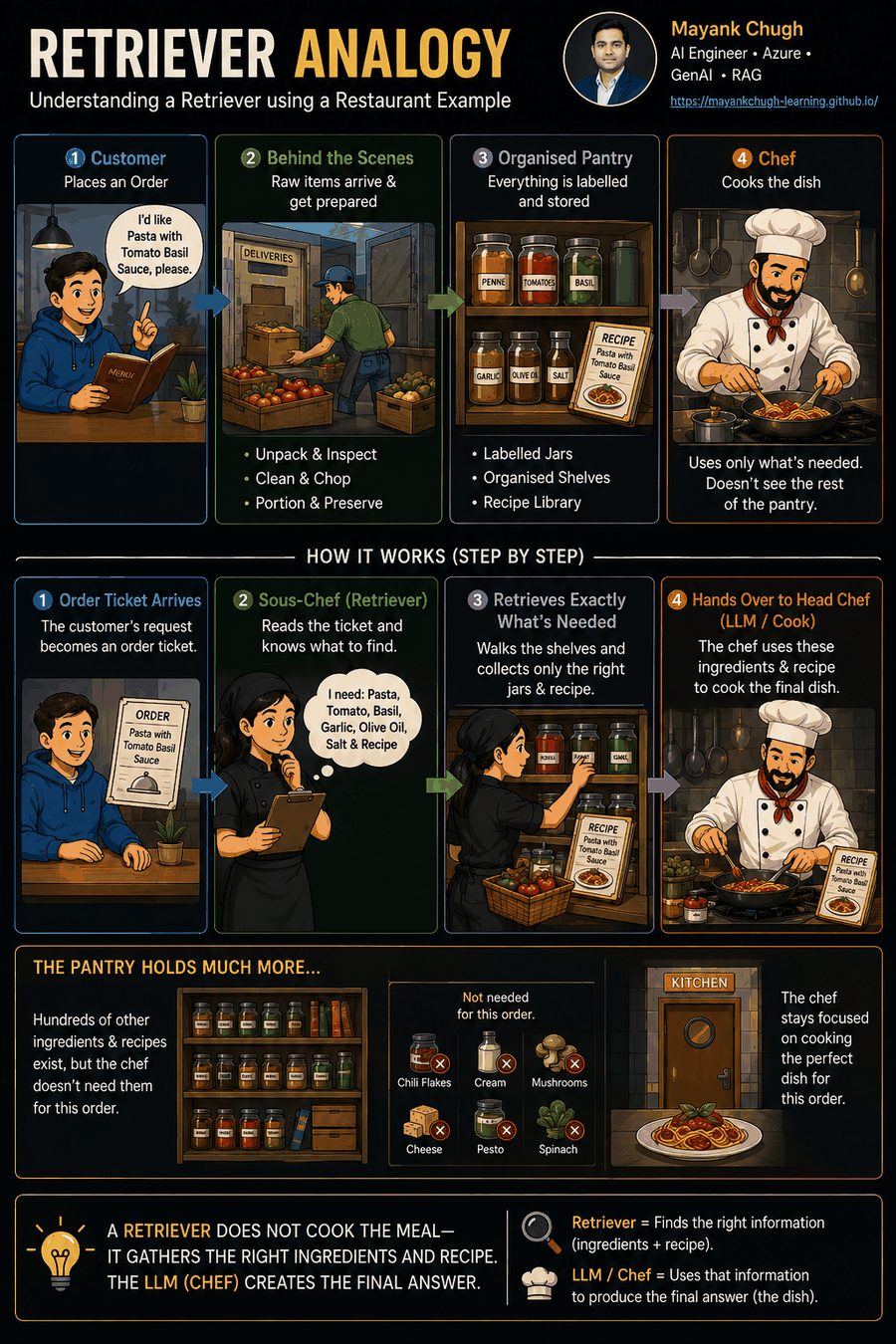
Restaurant
Sous-chef + head chef
User = customer · Documents = pantry · Retriever = chef’s assistant · LLM = head chef. The retriever gathers ingredients; it does not cook.
Check yourself: In one sentence, what does a retriever do — and what must it never claim to do?
02 · LangChain API
LangChain as_retriever knobs
From a vector store you typically build a retriever with a search type and kwargs, then invoke a query.
retriever = vector_store.as_retriever(
    search_type="mmr",
    search_kwargs={
        "k": 4,          # final number of documents to return
        "fetch_k": 20    # candidates considered by MMR
    }
)
documents = retriever.invoke("What is a vector database?")
for document in documents:
    print(document.page_content)
    print(document.metadata)
Knob
Meaning
k
Final number of results returned
filter
Metadata restriction
score_threshold
Minimum acceptable relevance score
fetch_k
Candidates fetched before MMR diversifies
lambda_mult
MMR balance: relevance vs diversity
search_type
Default
similarity
Return the most similar chunks (top-k).
Quality gate
score_threshold
Keep only chunks that pass score_threshold.
Diversity
mmr
Maximum Marginal Relevance — relevant and diverse; less redundant context.
Try it: how search type changes the top results
Query: “What is Llama 2?” · k=3 · threshold=0.75
03 · Metrics
Similarity metrics
Vector DBs commonly expose these three families:
Method
What it measures
Best result
Cosine similarity
Angle / direction between vectors (common for text embeddings)
Highest score
Euclidean distance (L2)
Straight-line distance
Lowest distance
Dot product
Sum of element-wise products; ≈ cosine when vectors are normalized
Highest score
Watch the polarity: cosine/dot are usually higher-is-better; L2 is lower-is-better. Know what your store’s score API returns.
04 · Metadata
Metadata filtering
Do not rely on semantic similarity alone. Metadata constrains search to department, year, document type, source, role, or tenant.
Top-5 semantic hits might include Finance / Legal / wrong year; after filtering for HR + 2026 only one remains — even if better HR docs never made the initial five.
documents = vector_store.similarity_search(
    "Show the HR leave policy for 2026.", k=5
)
filtered = [
    d for d in documents
    if d.metadata.get("department") == "HR"
    and d.metadata.get("year") == 2026
]
Post-filtering is weaker for strict access control: unauthorized documents can still sit in the intermediate candidate set, and you may need a larger initial k.
06 · Retrieval types
Sparse, dense, hybrid
Type
How it works
Example
Sparse
Exact keywords / BM25 / TF-IDF
Query employee leave policy hits docs with those terms
Dense
Embeddings + semantic similarity
How many days off… retrieves “20 days of annual leave”
Hybrid
Sparse + dense, then combine
HR leave policy 2026 gets exact terms and semantic paraphrases
Hybrid often wins when queries mix precise identifiers (years, codes, names) with natural language.
How you merge lists matters — see Result fusion and RRF vs Reranker.
07 · Query transforms
Query transformation
Improve the user’s query before retrieval so the system can find more relevant information. Rewrite, expand, decompose — or use HyDE / multi-query (next sections).
1
Query rewriting
Conversational / vague → clear standalone search query. “What did he say about it?” → “What did the CEO say about the 2026 acquisition?”
Critical for chat RAG that depends on history.
Complex question → atomic sub-queries → retrieve per sub-query → merge evidence.
Example: compare Company A vs B revenue + growth factors → four focused sub-queries.
HyDE = generate a hypothetical answer first, then use its embedding to retrieve real documents.
1
User query
e.g. “How does Llama 2 improve safety?”
2
LLM creates a hypothetical answer/document
“Llama 2 improves safety using supervised safety fine-tuning, RLHF, red teaming, and safety evaluation.”
3
Embed that hypothetical text
4
Vector search for real documents similar to it
A full hypothetical answer is often closer to document wording than a short question.
09 · Multi-query
Multi-Query Retriever
Creates multiple versions of the same user query, runs retrieval for each, then merges and deduplicates.
1
User query → generate variations
2
Search for each variation
3
Merge + remove duplicates → final docs
Example variations for “How does Llama 2 improve safety?”:
What safety techniques are used in Llama 2?
How was Llama 2 safety fine-tuned?
How does Llama 2 reduce unsafe responses?
Multi-query
Several questions
Generates multiple query versions and searches with each. Main goal: improve recall.
HyDE
One hypothetical answer
Does not create multiple questions. Embeds a hypothetical answer and searches with that. Main goal: improve semantic matching.
10 · Chunk strategies
Parent Document vs Sentence Window
Parent Document
Search small, return big
Embed child chunks (~300 tokens) for precise matching, but return the larger parent section (~1,500–2,000 tokens) that contains the hit.
Sentence Window
Search sentence, return neighbors
Embed single sentences for precision; when one matches, return that sentence plus nearby sentences as context.
Parent Document flow
Large doc → child chunks → embed children → query hits child → return its parent section. Small chunks retrieve accurately; parents give the LLM enough context.
Sentence Window example
Query: How is Llama 2 aligned using human feedback? may match Sentence 10 (“RLHF is used…”). Return Sentences 8–12 so the LLM sees SFT → preference data → RLHF → reward model → PPO.
LangChain has ParentDocumentRetriever built in. Sentence-window style retrieval needs custom metadata + replacement logic (LlamaIndex has a more direct built-in).
11 · Multi-hop
Multi-Hop Retrieval
Retrieve → use the result to retrieve again → combine evidence. Used when one retrieval pass cannot answer the question.
1
User query
“Who founded the company that developed Llama 2?”
2
Hop 1
Which company developed Llama 2? → Meta
3
Hop 2
Who founded Meta? → Mark Zuckerberg and co-founders
4
Combine evidence → final answer
No universal MultiHopRetriever in LangChain — implement with LangGraph (retriever + LLM + state), or use GraphVectorStoreRetriever with search_type="traversal" for graph corpora.
12 · Result fusion
Hybrid merge strategies & Result Fusion
Hybrid retrieval = use multiple retrievers. It does not by itself define how to merge outputs. Common merge options:
Approach
How it merges
Notes
Simple merge
Concatenate lists
No proper ranking; BM25 may dominate — weak for production
Weighted fusion
Combine normalized scores with weights
Score-based; normalize first if scales differ
RRF
Combine rank positions
Rank-based; scales need not match
Rerank after merge
Union candidates → cross-encoder
Common: top 50 → rerank → top 5
Weighted Fusion
Score-based
Final = (0.4 × BM25) + (0.6 × vector). Example: 0.4×0.8 + 0.6×0.9 = 0.86. Normalize scores when scales differ.
RRF
Rank-based
Points from rank positions across lists. Docs near the top in multiple lists win. Original RRF needs no weights.
LangChain EnsembleRetriever(weights=[...]) does weighted RRF, not raw score-weighted addition. For pure score fusion, normalize and combine yourself (or use DB-native hybrid).
13 · Diversity
Maximal Marginal Relevance (MMR)
MMR first takes the most relevant document, then picks remaining docs by balancing query relevance against diversity — avoiding near-duplicates of what is already selected.
Goal: relevant results without redundant / highly repetitive chunks for the LLM.
Worked example (from PDF)
Query: How does Llama 2 improve safety? · fetch_k=5 · k=2 · λ = 0.5
Doc
Query similarity
Sim with Doc A
MMR score (λ=0.5)
Doc A
0.95
—
Selected first (highest relevance)
Doc B
0.90
0.95
−0.025 (too similar to A)
Doc C
0.88
0.40
0.24
Doc D
0.84
0.20
0.32
Doc E
0.80
0.10
0.35 ← chosen next
Similarity only
Doc A, Doc B
Both may say almost the same thing.
MMR
Doc A, Doc E
E is slightly less relevant but adds new information.
YouTube trick: without MMR you get “Python Tutorial Part 1–4”; with MMR you get Tutorial + Project + Interview + Best Practices.