Module 01
Introduction
In 2026, a clear divide is forming. On one side, people use Claude Code to build applications, automate workflows, and ship work that used to take weeks. On the other side, people still do everything manually — limited by what they can accomplish alone.
This course is designed to put you on the right side of that divide. It is a complete beginner-to-advanced guide covering every major Claude concept with real working examples. Whether you come from a technical or non-technical background, the goal is the same: understand the system deeply enough to use it daily and explain it to others.
The agentic loop, installation on all operating systems, slash commands, permission modes,
the .claude folder, CLAUDE.md, context management, skills, hooks, MCP,
sub-agents, agent teams, plugins, scheduling, agentic workflows, multi-agent pipelines,
API/n8n automation, and a capstone full-stack build (19 modules total).
Each section includes architecture diagrams and practical examples — model tiers, agentic loop, CLAUDE.md, skills, MCP, hooks, and more.
Expanded notes extracted from the course PDFs (rewritten, not copied verbatim) live in crash-course-pdf-notes.md. Certification-oriented slides are also summarized there and in CCA-F prep (HTML) — domains, scenarios, P4/P5, checklists.
Module 02
What is Claude?
Claude is an AI assistant built by Anthropic, an AI research company focused on safety and reliability. Anthropic was founded by researchers who previously worked on large language models elsewhere; their mission is to build capable AI systems that are trustworthy and aligned with human values.
Anthropic vs. the broader AI landscape
If ChatGPT made conversational AI mainstream through OpenAI, Claude is Anthropic's equivalent product line. Both companies build large language models (LLMs), but Anthropic emphasizes constitutional AI, safety research, and enterprise-grade reliability.
The Claude model family
Claude models are organized into tiers, each optimized for different trade-offs:
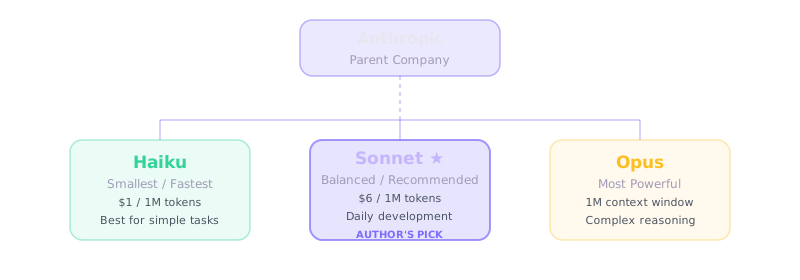
| Model | Strength | Best for |
|---|---|---|
| Haiku | Fastest, lowest cost | Quick tasks, sub-agents, high-volume automation |
| Sonnet | Balanced speed and intelligence | Daily coding, analysis, most Claude Code sessions |
| Opus | Most capable, deepest reasoning | Complex architecture, hard debugging, research |
What is an LLM?
At its core, every Claude model is a Large Language Model — a neural network trained on vast amounts of text (and increasingly images and code). Think of it like a brain trained on books, documentation, and conversations. When you send a prompt, the model predicts the most likely next tokens (words and symbols) to produce a coherent response.
Claude, ChatGPT, and Gemini all work this way. The differences lie in training data, safety tuning, context window size, tool use, and how each product wraps the model in a user interface or agent runtime.
Claude on the web is a conversation with a brain. Claude Code is that same brain with hands — it can read files, run commands, and change your project.
Sonnet is the sweet spot for most Claude Code sessions — strong enough for real work without Opus-level cost. Use Haiku for sub-agents and high-volume tasks; reserve Opus for the hardest reasoning.
Module 03
Claude Surfaces: Web, Desktop, and Code
Claude is available in three primary forms. Understanding the distinction is essential.
| Surface | What it is | Can access your files? |
|---|---|---|
| Claude.ai (web) | Browser chat interface at claude.ai | No — unless you upload files manually |
| Claude Desktop | Native macOS / Windows app | Limited — chat + Cowork features; not full filesystem |
| Claude Code | Terminal / IDE agent | Yes — full read/write in your project directory |
Claude.ai — the chat interface
Sign in at claude.ai with email, Google, or Apple. The interface is a text box where you ask questions, upload documents, analyze data, write content, or get coding help. Free and paid tiers (Pro, Max) unlock higher usage limits and advanced models.
Claude Desktop
The desktop app wraps the same Claude brain in a native window. It adds conveniences like system notifications and quick access, but it is still fundamentally a chat product — not a coding agent with shell access.
Claude Code — brain with hands
Claude Code installs on your machine and runs in your terminal or IDE. It connects to Anthropic's API for the model, but executes locally: reading files, running bash commands, installing packages, writing code, and iterating until the task is done.
# Example: Claude Code can do what chat cannot
You: "Create a Python script that generates a PDF explaining bubble sort"
Claude Code:
  1. Writes bubble_sort.py
  2. pip install reportlab
  3. Runs the script
4. Confirms output.pdf existsClaude chat answers questions. Claude Code does work. That difference — passive conversation vs. active agent — is the foundation of everything that follows.
Module 04
The Agentic Loop
The agentic loop is the most important concept in Claude Code. It explains why Claude can autonomously complete multi-step tasks instead of giving you instructions to run yourself.
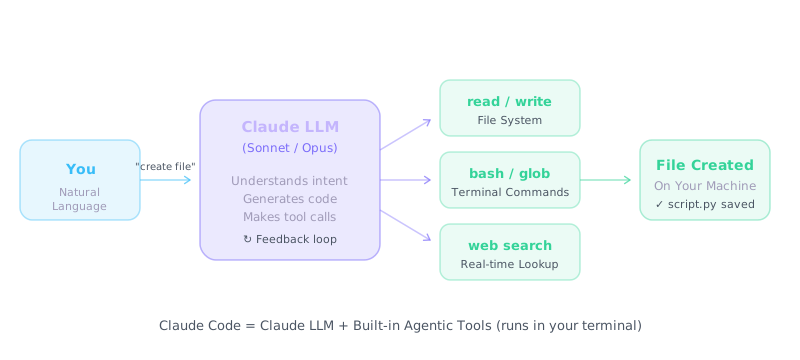
Built-in tools
- read / write / edit — create and modify project files
- bash — run terminal commands (install, test, git)
- glob / grep — search the codebase efficiently
- web_search / web_fetch — look up docs and live information
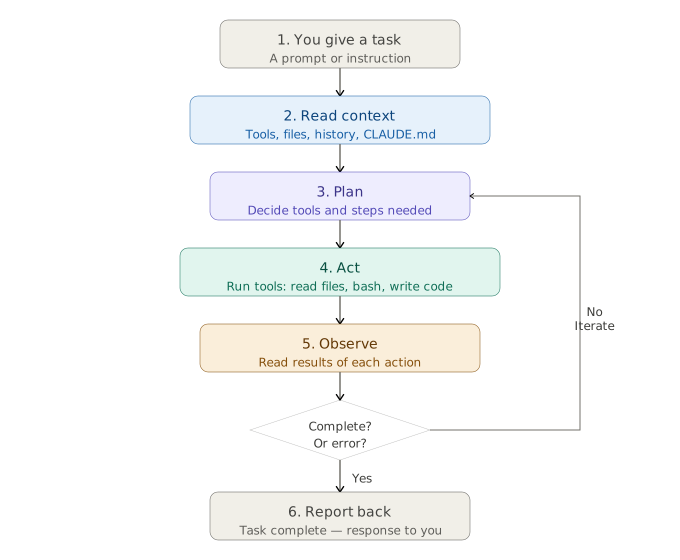
- You give a task — a prompt or instruction in natural language.
- Read context — Claude loads relevant files, CLAUDE.md, conversation history, and tool definitions.
- Plan — it decides which tools and steps are needed.
- Act — it runs tools: read/write files, bash commands, web fetch, MCP calls.
- Observe — it reads the output of each action.
- Iterate — if the task is not complete, it loops back to plan/act/observe.
- Report — when done, it summarizes what was accomplished.
This loop runs automatically. You are not micromanaging each command — you are directing an agent that thinks, acts, and self-corrects. Skills, hooks, MCP, and sub-agents all plug into different stages of this loop.
Module 05
Installation & Setup
Claude Code runs on Windows, macOS, and Linux. The recommended install is via the official installer script in your terminal.
Prerequisites
- Basic terminal comfort (no deep coding required — Claude does the heavy lifting)
- VS Code or Cursor recommended for the Claude Code extension
- Anthropic API credits (pay-as-you-go) or Claude Pro/Max subscription
Windows (PowerShell)
irm https://claude.ai/install.ps1 | iexmacOS / Linux
curl -fsSL https://claude.ai/install.sh | bash
# Alternative:
npm install -g @anthropic-ai/claude-code
Verify installation
claude --version
claude doctor   # diagnoses PATH, auth, and environment issues
claude
On first run, Claude Code prompts you to authenticate with your Anthropic account. You can use a Claude Pro/Max subscription or API billing.
System requirements
- Node.js may be required depending on install method (native installer often bundles dependencies).
- Git recommended for version-controlled projects.
- A terminal: PowerShell, Terminal.app, or any Linux shell.
Running in VS Code / Cursor
Install the official Anthropic Claude Code extension from the marketplace. It embeds Claude in your editor sidebar with the same agent capabilities as the terminal.
Permission modes
Claude Code supports different autonomy levels:
- Normal — asks before running potentially destructive commands.
- Plan mode — read-only; Claude plans but does not execute.
- Auto-accept — runs approved tool categories without repeated prompts.
If claude is not recognized after install, restart your terminal or add
the install path from the installer output to System → Environment Variables → Path, then reopen the terminal.
At console.anthropic.com, add a small credit balance (e.g. $10) for learning. You pay only for tokens used — no monthly lock-in like a subscription.
Rough guide: one token is about four characters of English text (often described as roughly three quarters of a word). Use this when estimating how fast long chats or tool output fill the context window.
Module 06
The .claude Folder
Every Claude Code project can contain a .claude/ directory that configures
agents, skills, hooks, and settings for that workspace.
.claude/
├── CLAUDE.md          # Project instructions (also at repo root)
├── settings.json      # Local settings & permissions
├── hooks.json         # Hook event configuration
├── hooks/             # Hook scripts (Python, shell, etc.)
├── skills/            # Custom skills (SKILL.md files)
└── agents/            # Sub-agent definitions
Key files explained
settings.json— permission allowlists, model preferences, hook paths.hooks.json— maps events (PreToolUse, PostToolUse, SessionStart) to scripts.skills/— folders with SKILL.md playbooks invoked via slash commands.agents/— markdown files defining specialist sub-agents.
See the Slash Commands reference for commands like
/memory, /config, /status, and /doctor
that interact with this folder.
Commit .claude/ to git so everyone gets the same CLAUDE.md, skills, agents, and hooks — no per-developer setup.
Module 07
CLAUDE.md — Your Project Brain
CLAUDE.md is the single highest-leverage file in Claude Code: by default it is
injected into every session. The same principles apply to
AGENTS.md for Cursor, Zed, OpenCode, and other harnesses.
Recommended deep dive:
HumanLayer — Writing a good CLAUDE.md.
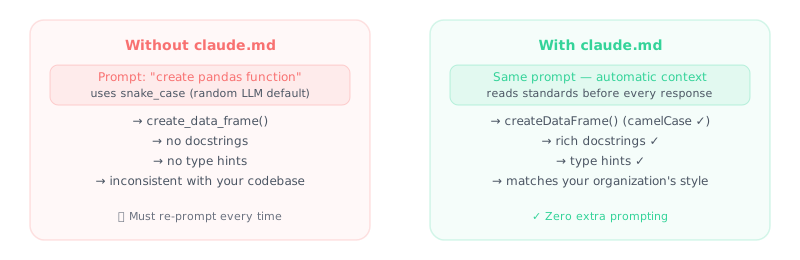
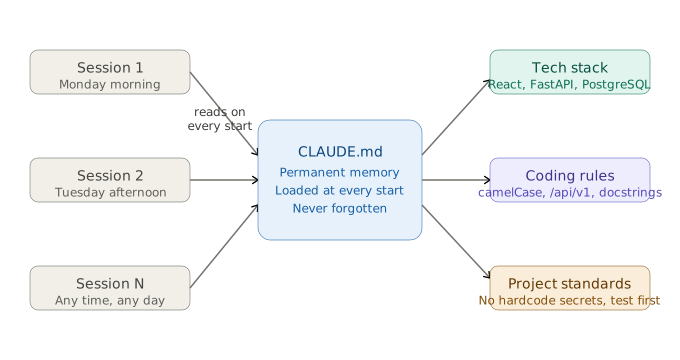
LLMs are (mostly) stateless
The model does not “remember” your repo between sessions. At the start of each chat,
Claude knows only what you put in context — and CLAUDE.md is the standard
way to onboard it. Treat every session as day one unless you reload project instructions.
Onboard with WHAT, WHY, and HOW
| Section | Purpose | Examples |
|---|---|---|
| WHAT | Map of the codebase | Stack, monorepo apps vs shared packages, where to look for APIs vs UI |
| WHY | Purpose of the project | What each service does, who uses it, constraints that shape design |
| HOW | How to work safely | bun vs npm, test/typecheck commands, how to verify changes |
Do not stuff every possible command into one file — that hurts quality. Include only instructions that are broadly applicable to most tasks in the repo.
# Example CLAUDE.md excerpt (keep it short)

## WHAT
- Python 3.12 + FastAPI backend in `src/`, React UI in `frontend/`

## WHY
- Task manager for a small team; JSON file storage (no prod DB yet)

## HOW
- Tests: `pytest` from repo root
- API: `uvicorn src.api:app --reload`
- Only `git commit` when the user explicitly asks
Why Claude sometimes ignores CLAUDE.md
Claude Code wraps your file in a system reminder that context
may or may not be relevant to the current task. If CLAUDE.md is full of
niche rules (database schema details while you are fixing CSS), the model may deprioritize
the whole file — including good rules. Fix: fewer, universally applicable instructions.
Less instructions is more
- Frontier models follow on the order of ~150–200 instructions reliably; quality drops as count grows.
- Claude Code’s own system prompt already carries many instructions (~50) — your budget is smaller than it looks.
- Models weight the start and end of context most; a bloated middle hurts everything.
- Community guidance: aim for < 300 lines; many teams stay under 60.
Progressive disclosure
Keep task-specific detail out of CLAUDE.md. Put it in separate markdown files
(or skills) and list them with one-line descriptions so Claude reads them only when needed:
agent_docs/
  building_the_project.md
  running_tests.md
  service_architecture.md

# In CLAUDE.md: "Before large changes, read the relevant file in agent_docs/."
Prefer pointers over copies: use path/to/file.py:42 references
instead of pasting code that will go stale. Skills (Module 09) are the tool-oriented
version of the same idea.
Claude is not your linter
Avoid long style guides in CLAUDE.md. Use Biome, ESLint, Ruff, Prettier, etc.
Run formatters in a PostToolUse hook (Module 10) or a dedicated slash command
for “format this PR.” LLMs are slow and expensive compared to deterministic linters; they
also learn patterns from searching your existing code.
Do not blindly auto-generate
/init and similar generators are useful first drafts — not finished
files. A bad line in application code is local; a bad line in CLAUDE.md affects
every plan, patch, and test in every session. Curate each line by hand after generation.
Place CLAUDE.md at the repo root or .claude/CLAUDE.md (Claude merges both).
Commit it so the whole team shares the same onboarding.
Every line loads every session. Universally applicable rules only — move the rest to
agent_docs/, skills, or hooks.
Maintain it like technical debt
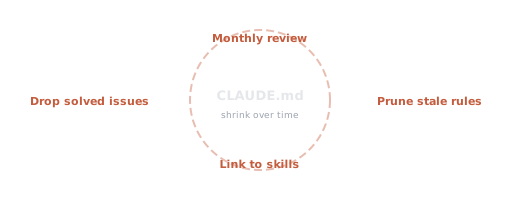
- Review monthly — remove conventions that no longer match the codebase.
- Prune aggressively — delete rules for problems you fixed in code.
- Prefer pointers — link to
agent_docs/,docs/, or a skill. - Do not archive every past fix — not a changelog of one-off hotfixes.
Module 08
Context Management
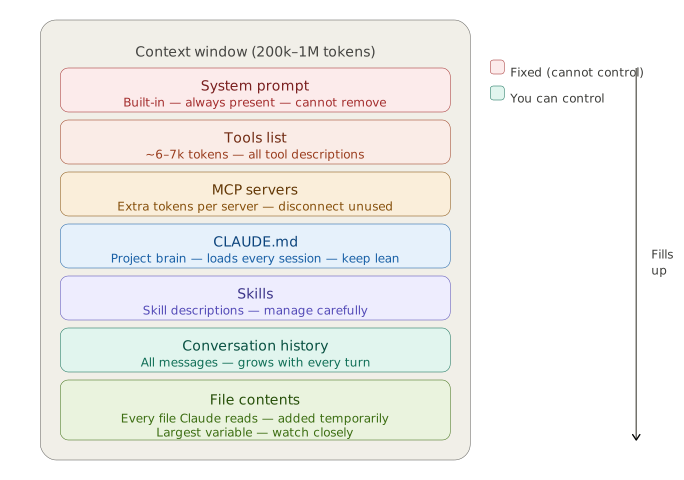
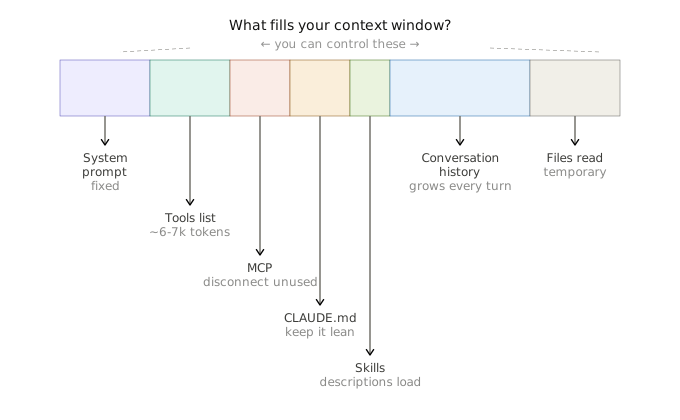
Claude has a finite context window — the total amount of text (measured in tokens) it can hold in working memory for one session. Managing context keeps Claude sharp across long conversations.
Primacy and recency bias
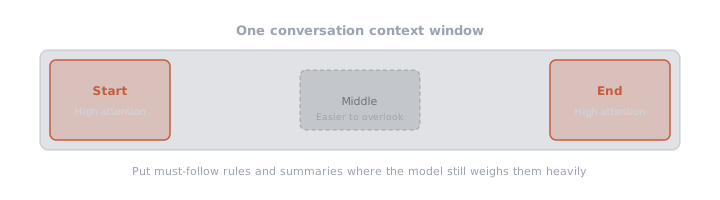
Instructions buried in the middle of a huge history are easier to miss. Put must-follow
constraints in CLAUDE.md, repeat key goals after /compact, and summarize
before long tool-heavy stretches.
Reducing context rot
- Move long workflows from CLAUDE.md into skills (on-demand load).
- Enforce guardrails with hooks instead of repeating warnings in prompts.
- Limit active MCP servers — each server's tool definitions add fixed overhead every turn.
- Use plan mode before large unfamiliar changes.
- Label milestones (V1, V2) so Claude does not mix old and new architecture.
Token budgeting tips
- Start fresh sessions for unrelated tasks.
- Use sub-agents for deep exploration without polluting main context.
- Reference files by path instead of pasting large blobs.
- Keep CLAUDE.md focused — every line consumes tokens every session.
Compact, Clear, and Rewind
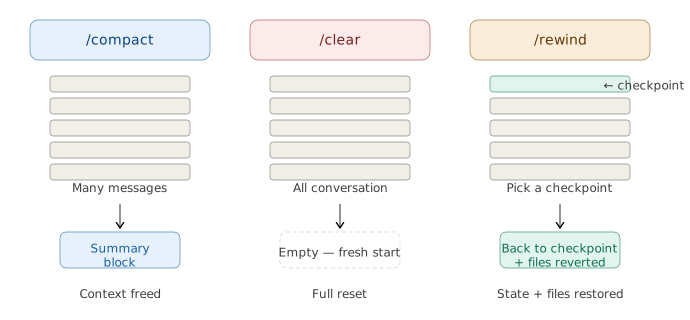
- /compact — summarizes older conversation to free space.
- /clear — wipes conversation history (keeps CLAUDE.md).
- /rewind — restores project files to a prior checkpoint (like undo for code).
Cost and usage tracking
Long agent sessions with many tool calls add up quickly. Claude Code exposes built-in visibility so you are not surprised by API bills:
- /usage — session token usage and limits (subscription tiers).
- /cost — estimated spend for API-billed accounts.
- /status — model, context %, and session metadata at a glance.
- /insights — patterns across past sessions (where time and tokens go).
Session management: use /rename for meaningful session names,
/resume to continue work, and /export to archive important threads.
Start a new session when the task domain changes — unrelated history wastes tokens and confuses the model.
Module 09
Skills — Reusable Playbooks
Skills are markdown instruction files (SKILL.md) that encode repeatable
workflows. Invoke them with a slash command instead of re-explaining the process every time.

/skill-name → Claude follows your steps every time.claude/skills/deploy/SKILL.md
---
name: deploy
description: Deploy the app to staging
---
# Deploy to Staging
1. Run `npm run build`
2. Run `npm run test`
3. Deploy with `npm run deploy:staging`
4. Verify health endpoint
Skills live in .claude/skills/ (project) or your user skills directory (global).
They cost zero tokens until invoked — Claude reads the skill only when you trigger it.
.claude/skills/my-skill/
├── SKILL.md       # steps (loaded only when invoked)
├── scripts/       # optional: pre-written Python/shell
└── references/ # optional: docs Claude should read/deploy — follows your skill exactly; best for repeatable automation.
CLAUDE.md is always loaded. Skills are on-demand playbooks for specific workflows like code review, deployment, or writing PR descriptions.
Point skills at scripts/ files instead of regenerating code each run — saves thousands of tokens and keeps behavior consistent.
Module 10
Hooks — Automatic Background Scripts
Hooks run scripts automatically on Claude Code events — without using tokens or prompts. They enforce standards, log activity, and guard security.
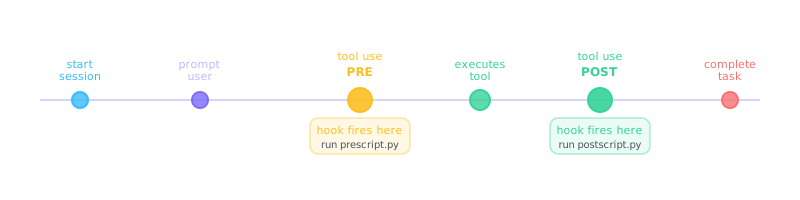
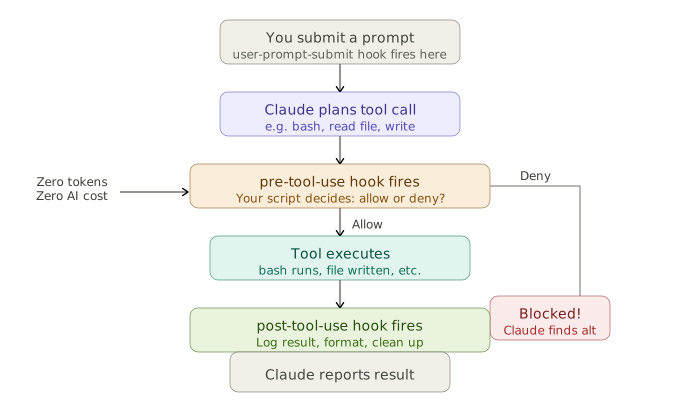
Three roles (event-driven)
- Automation — format, test, or deploy after edits without asking the model.
- Logging — audit tool use to disk (zero LLM tokens).
- Guardrails — block destructive commands before they run.
Popular use cases
- Security — block
rm -rfor force-push before execution - Logging — record every tool call to a file (zero LLM tokens)
- Notifications — ping Slack or play a sound when Claude needs input
- Validation — run lint/tests automatically after file writes
Example: auto-format on file write
// hooks.json
{
  "hooks": {
    "PostToolUse": [
      {
        "matcher": "Write|Edit",
        "hooks": [{ "type": "command", "command": "python .claude/hooks/auto_format.py" }]
      }
    ]
  }
}
Common hook use cases
- Auto-format Python/JS after every edit
- Block dangerous commands (rm -rf, force push)
- Log session activity to a file
- Run tests after code changes
Module 11
MCP — Model Context Protocol
MCP (Model Context Protocol) is an open standard that lets Claude connect to external tools and data sources: GitHub, Slack, databases, browsers, custom APIs, and more. Think of it as a USB-C port — one config format works across Claude Code, Cursor, and VS Code.

.mcp.json — servers expose tools like search, GitHub, or Playwright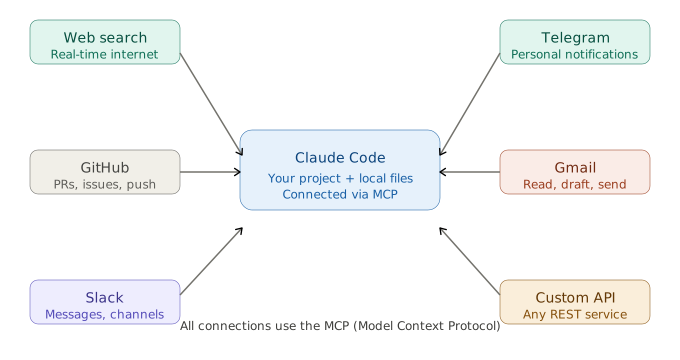
Local vs. hosted servers
| Type | How it runs | Best for |
|---|---|---|
| Local (stdio) | uvx or npx on your machine |
Most MCP servers today — secure stdin/stdout |
| Hosted (HTTP) | Provider URL + API key | Tavily search, managed APIs — no local install |
How it works
- You configure MCP servers in Claude Code settings.
- Each server exposes tools (e.g.,
create_issue,query_db). - Claude discovers and calls these tools during the agentic loop.
// Example MCP config (conceptual)
{
  "mcpServers": {
    "github": { "command": "npx", "args": ["-y", "@modelcontextprotocol/server-github"] },
    "postgres": { "command": "npx", "args": ["-y", "@modelcontextprotocol/server-postgres", "postgresql://..."] }
  }
}
MCP turns Claude from a local coding agent into a hub for your entire toolchain. Combine it with live web search and browser automation for research-heavy tasks.
Only install servers you trust — they run with access mediated by Claude. Prefer well-known providers (e.g. Microsoft Playwright MCP) and check source before adding community servers.
Failure modes to design for

| Failure | What to do |
|---|---|
| Auth failed | Validate API keys before long runs; fail fast with a clear message |
| Connection closed / server down | Health-check tool; restart local stdio server |
| Timeout | Shorter calls, async jobs for slow APIs |
| Tool returned error | Structured error text so Claude can retry or escalate |
Custom MCP servers
Beyond community servers, you can build your own with the MCP SDK (Python or TypeScript). Local servers typically use stdio transport; team-shared services often use HTTP/SSE with API-key auth. See CCA-F prep: custom MCP server and `.mcp.json` wiring in this repo.
Claude Code as an MCP server
The relationship is bidirectional: Claude Code consumes MCP tools from other
servers, and can also expose coding capabilities to external orchestrators
(IDEs, LangGraph graphs, internal platforms) that speak MCP. Configuration and CLI flags evolve —
check the official
MCP docs
for the current claude mcp subcommands. Architecturally: your orchestrator stays
thin; the heavy repo edit / test / git loop runs inside Claude Code.
Module 12
Sub-agents — Specialist Workers
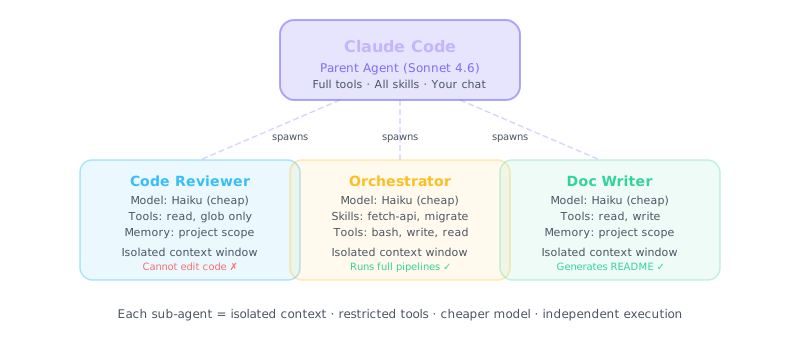
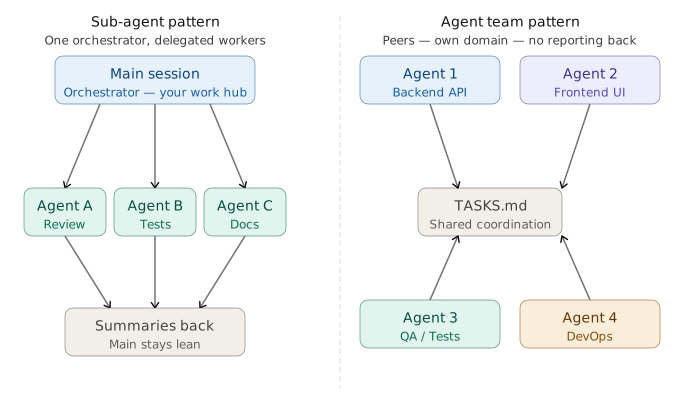
Sub-agents are separate Claude sessions spawned for focused tasks. They run in isolated context windows, so exploration does not bloat your main conversation.
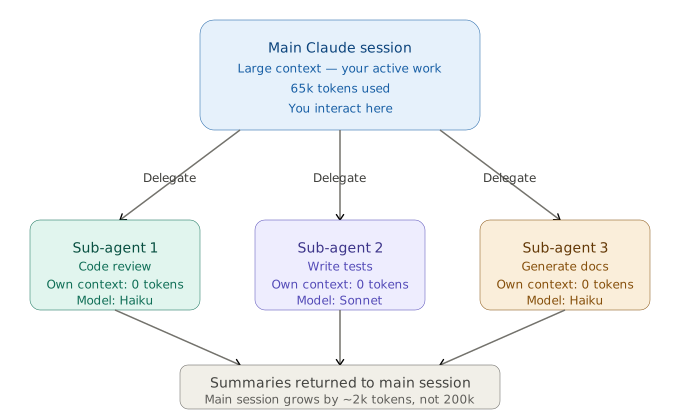
Why not one agent for everything?
- Context overflow — tool results stack until the window fills.
- Sequential bottleneck — one thread cannot explore in parallel.
- Specialization — narrow agents with focused tools beat generic instructions.


Benefits
- Use cheaper/faster models (Haiku) for simple sub-tasks.
- Parallel exploration of different parts of a codebase.
- Main session stays focused on orchestration.
- Per-agent tool allowlists — controlled access to bash, write, or MCP.
Who may spawn sub-agents?
| Role | Task tool (spawn) | Why |
|---|---|---|
| Coordinator | Yes | Must delegate work to specialists |
| Standard worker | No | Prevents uncontrolled recursive delegation |
| Sub-coordinator | Only if designed for a third tier | Explicit hierarchy, not accidental nesting |
With --resume <session-name>, tell Claude what changed on disk since last run.
It does not automatically detect external edits — stale tool results lead to wrong decisions.
Define agents in .claude/agents/ with a name, description, and instructions.
Claude Code's Task tool spawns them automatically when appropriate, or you can request one explicitly.
Module 13
Agent Teams — Parallel Coordination
Agent teams go beyond sub-agents: multiple Claude instances work in parallel on the same project, coordinating directly with each other.
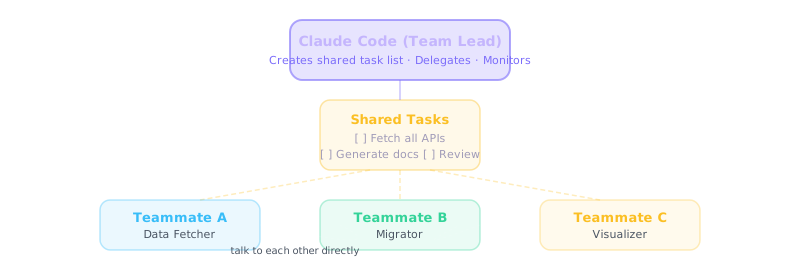
Agent Teams are beta — enable with "experimental_agent_teams": true in .claude/settings.json. Avoid production-critical workflows until stable.
When agent teams shine
- Large-scale refactors across many files
- Full-stack feature work (frontend + backend + tests in parallel)
- Parallel code review and test authoring
- Security or compliance audits at repository scale
- Long onboarding passes over an unfamiliar codebase
| Feature | Sub-agents | Agent Teams |
|---|---|---|
| Context | Isolated, reports back | Shared project, peer coordination |
| Best for | Focused sub-tasks | Large parallel builds |
| Model choice | Can use Haiku per agent | Configurable per teammate |
Module 14
Plugins, Scheduling & Loops
Plugins
Plugins bundle skills, agents, hooks, and MCP configs into installable packages. Install a plugin once and gain an entire capability set — code review, deployment pipelines, security auditing, and more.
Some plugins integrate LSP (Language Server Protocol) support so Claude Code can use the same diagnostics and navigation your IDE gets from language servers.
Scheduling & loops
Claude Code supports automated recurring runs — useful for nightly test fixes, dependency updates, or monitoring tasks.
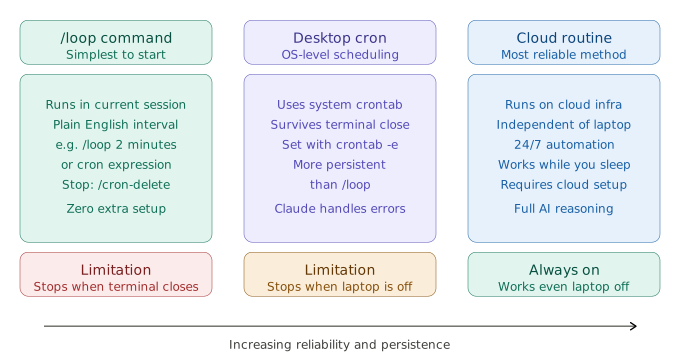
- Cron / Task Scheduler — run
claude -p "your prompt"on a timer. - CI/CD integration — GitHub Actions with Claude for PR review.
/loop— schedule prompts inside a session (e.g./loop 30m check deploymentor cron syntax/loop "0 9 * * *" run daily review).
# /loop examples (Claude Code 2.1.72+)
/loop 30m check if the deployment finished
/loop "0 9 * * *" invoke my fetch-api skill
/cron delete <job-id> # cancel a scheduled job/loop runs while your terminal session is active. For true background jobs, use system cron calling claude -p "…".
Headless and unattended runs
When Claude Code runs on a schedule (cron, CI, or overnight loops), treat it like production automation:
- Start read-only; widen permissions only after a dry run succeeds.
- Write outputs to safe, reviewable paths — not destructive production actions.
- Require human approval for irreversible steps (deploy, delete, send email).
- Log every run; test hooks and prompts in a sandbox first.
| Avoid | Prefer |
|---|---|
| “Deploy when tests pass” | “When tests pass, write ready-to-deploy.md and notify a human to approve deploy” |
| “Fix lint by editing all source files” | “List lint issues in reports/lint.md — do not modify source” |
Module 15
Capstone Project — Task Manager App
The capstone ties every module together. You build a full-stack productivity app from
a plain-English spec using Claude Code end to end. The video course walkthrough uses a
productivity app (DailyFlow-style); this repo's reference build is
examples/DailyFlow/.
Typical flow from a greenfield repo:
/init— draft CLAUDE.md and project context (curate the file afterward; see Module 07).- Use an explore agent or codebase search to map structure.
- Iterate with the agentic loop until tests and UI work.
Project spec (starter)
Build a Task Manager with:
- React frontend (TypeScript)
- FastAPI backend (Python)
- JSON file storage
- CLI + REST API
- Tests with pytest
Concepts applied
- CLAUDE.md — define stack, commands, and conventions upfront.
- Agentic loop — Claude plans, scaffolds, implements, and tests.
- Sub-agents — separate test-writer and security-auditor agents.
- Hooks — auto-format Python after edits.
- Skills —
/build-appskill for repeatable scaffolding.
Reference implementations live in the examples/ folder in this repo:
examples/DailyFlow/— the full-stack productivity app built in the course video (React + FastAPI).examples/Task-Manager-App/— sub-agents, skills, and hooks in a compact Python app.examples/SKILLS-DEMO/,examples/SplitMoney/,examples/CLAUDE-MD/— module-specific demos (seeexamples/README.md).
Clone the repo, open any example in Claude Code, and explore its
.claude/ configuration to see every concept in production use.
Pick one thing you want to build — a dashboard, automation script, or internal tool. Write a CLAUDE.md, install Claude Code, and describe the app in plain English. Let the agentic loop do the rest.
Module 16
Agentic Coding Workflows
Claude Code is not autocomplete — it is an autonomous agent with direct filesystem and terminal access. It can plan multi-step software work, run tests, debug failures, and commit when you allow it. This module maps day-to-day engineering workflows to the agentic loop from Module 04.
Repository-scale understanding
- Start with
/initor a explore sub-agent to map folders, entry points, and conventions. - Use
glob/grepinstead of pasting whole files — keeps context lean. - Ask for an architecture summary in
docs/architecture.mdbefore large refactors.
Generation, refactoring, and multi-file changes
- Greenfield: plain-English spec → scaffold → iterate with tests.
- Refactor: name the pattern (e.g. “extract service layer”) and scope directories.
- Multi-file: use plan mode first; then
/batchor sub-agents for parallel slices.
Tests, bugs, and documentation
- Tests: “Add pytest coverage for module X” — Claude runs tests and fixes failures in the loop.
- Bugs: paste stack trace + repro steps; ask for root cause before the fix.
- Docs: generate README, ADRs, or API docs from code — review like any PR.
Plan (read-only) → scoped implementation → test → commit message. Repeat per feature, not one giant prompt.
Module 17
Extended Thinking, AGENTS.md & CI/CD
Extended thinking for hard problems
For complex architecture, subtle bugs, or security reviews, increase reasoning depth with
/effort high or /effort max (Opus). Extended thinking spends more
tokens on internal reasoning before answering — use it when mistakes are expensive, not for
routine edits. Balance with Module 08 cost tracking.
Autonomous multi-step tasks
Combine a clear end state, permission boundaries, and checkpoints: “Implement feature X; after each milestone run tests and stop if coverage drops.” Use skills for repeatable pipelines and hooks for guardrails. Overnight or cron runs should default to read-only or report-only outputs (see Module 14).
AGENTS.md — team-wide AI guidelines
AGENTS.md (repo root) is the open-source equivalent of CLAUDE.md for
Cursor, Zed, OpenCode, Codex, and similar harnesses. The same WHAT/WHY/HOW and
“less is more” rules from
HumanLayer’s guide
apply. Typical contents:
- Build/test commands and required checks before merge
- Directory layout and naming conventions
- Security rules (no secrets in commits, no force-push to main)
- When to ask a human vs. proceed autonomously
CLAUDE.md remains Claude-specific (loaded every Claude Code session).
Many teams keep shared rules in AGENTS.md and Claude-only details in
CLAUDE.md or .claude/CLAUDE.md.
CI/CD and GitHub Actions
- PR review:
/install-github-appadds the Claude GitHub app; it comments on pull requests with logic and security feedback. - Scheduled jobs: GitHub Actions cron +
claude -p "prompt"with restricted tokens and read-only scopes first. - Artifacts: write reports (
reports/lint.md, test summaries) instead of auto-deploying from CI without human approval.
# Example pattern (conceptual CI step)
claude -p "Summarize test failures from artifacts/; do not modify source" \
  --allowedTools "Read,Grep"
Module 18
Claude Code in Multi-Agent Pipelines
In production systems, Claude Code often plays the specialist coding sub-agent inside a larger orchestration layer — not the only brain in the stack.
Roles in a pipeline
| Layer | Typical responsibility |
|---|---|
| Orchestrator | Routing, planning, tool choice, user-facing chat |
| Claude Code | Repo edits, bash, tests, git, MCP tools on disk |
| Review agent | Diff review, security pass, style checklist |
Handoffs and result handling
- Pass structured handoff payloads: goal, paths touched, test status, open questions.
- Orchestrator receives summaries, not full tool logs — same principle as sub-agents.
- Code review workflows: implementer agent → reviewer agent → human merge.
OpenAI Agents SDK and other orchestrators
Frameworks like the OpenAI Agents SDK support handoffs between agents. A common pattern: triage agent hands off to a “coding” agent that wraps Claude Code (CLI or MCP). Keep one source of truth for repo state (git) and idempotent handoff messages.
Claude Code + LangGraph
LangGraph models workflows as a graph of nodes (state machines). A hybrid setup:
- LangGraph nodes handle routing, retrieval, approvals, and external APIs.
- A dedicated node invokes Claude Code (subprocess or MCP) for file edits and test runs.
- Graph state stores ticket ID, branch name, and last test result — not entire file contents.
This avoids stuffing large codebases into the orchestrator’s context while still getting Claude Code’s full tool surface on the repository.
Module 19
Claude API, Co-Work, n8n & Enterprise MCP
Topics from Claude Automation Mastery — API integration, advanced coding, team collaboration, and workflow platforms — complement terminal-first Claude Code.
Claude API and models (production)
- Model choice: Haiku (latency/cost), Sonnet (default), Opus (hardest tasks).
- Messages API: system + user/assistant turns; tool use for custom agents outside Claude Code.
- Structured outputs: JSON schema or tool definitions so downstream code parses reliably.
- Rate limits: tiered RPM/TPM — batch work, backoff, and queue long jobs.
- Production: API keys in secrets managers, logging, evals, and cost alerts per environment.
Claude Code — advanced codebase handling
- Multi-file reasoning: scoped tasks + explore agents; avoid one prompt for the whole monorepo.
- Debugging: reproduce → minimal fix → regression test; use
/effort highfor heisenbugs. - Large repos: strong CLAUDE.md pointers, .claudeignore, MCP only for needed integrations.
Claude Co-Work mode (Desktop)
Co-Work (Claude Desktop) targets collaborative team workflows: shared context, delegating multi-step office tasks, and pairing with local files — lighter than full Claude Code filesystem access but richer than browser-only chat. Use Desktop for stakeholder-friendly sessions; use Claude Code when you need deep repo + terminal automation.
n8n workflow automation
n8n is a low-code automation platform for chaining triggers, HTTP requests, databases, and AI steps. Typical Claude + n8n patterns:
- Webhook → n8n → Claude API node → Slack/email/CRM
- Scheduled digest: pull metrics → Claude summarizes → post to Teams
- Human-in-the-loop: approval node before any write to production systems
n8n orchestrates business process; Claude Code orchestrates repository work. Connect them when a ticket in Jira should spawn a branch and PR via your custom integration.
Enterprise MCP integration
- Central registry of approved MCP servers (security review, versioning).
- SSO/OAuth for remote MCP (Slack, Google, internal APIs).
- Audit logs via hooks; separate dev/staging/prod API keys.
- Bidirectional MCP: internal platforms call Claude Code; Claude Code calls internal tools.
Full checklist of training-slide topics → course modules: docs/syllabus-coverage.md.